
Hello everyone, I’m H.G Drums! 🥁
The metronome is on, but its click gets buried in the drum sound,
or to hear the beat clearly you turn the volume up so you can barely hear your own playing?
You can first change the timbre, then adjust the metronome volume.
This time I’ll use actual screen captures from the site to guide you to the “Effects and Volume” setting, and also introduce an often overlooked mute switch.
1. When is this setting useful?
When the metronome beat isn’t easy to distinguish, or it covers your hits,
adjust the timbre and volume so you can hear both sides clearly during practice.
This adjusts the metronome sound,
it does not change the actual drum kit volume, nor analyze or rate your performance.
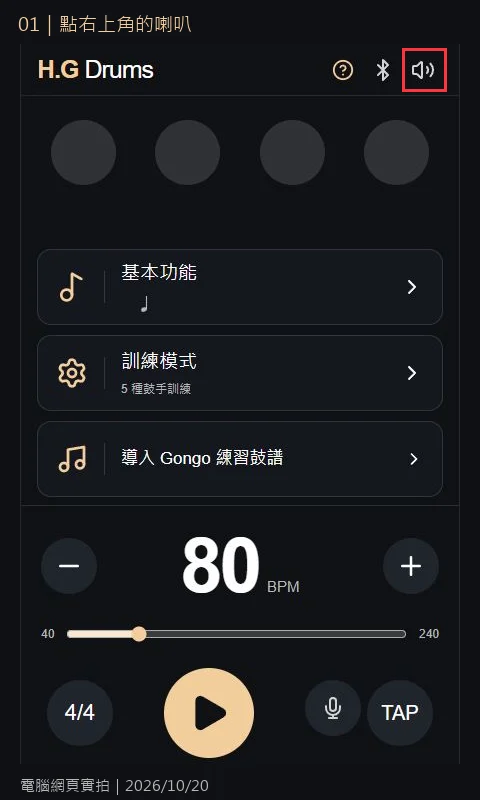
2. Turn on the metronome, click the speaker in the top-right corner
Firstturn on the H.G Drums metronome。
The demo screen uses BPM 80, 4/4 time, quarter notes, and playback has not started.
Click the speaker icon in the top-right to open “Effects and Volume.”
This time we only adjust the standard metronome sound, no microphone or training mode needed.
3. Choose a timbre, then adjust the volume
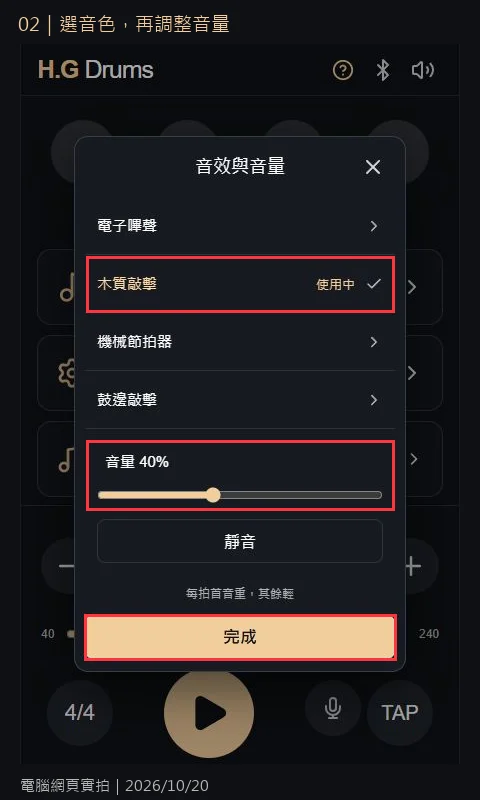
The panel currently offers four timbres:
Electronic beeps, wooden hit, mechanical metronome, rim click.
This time click “Wooden Hit” and confirm that it shows “In Use” beside it.
Then set the volume slider to 40% as the demonstration setting.
40% is not a fixed recommendation, nor does it mean every device will sound equally loud.
Start from a lower volume and adjust according to your device and environment after playing.
4. Even with a volume number, you may still be muted
When you click “Mute,” the button changes to “Unmute,”
and the speaker icon in the top-right also shows a mute symbol.
Note that the displayed volume is still 40% in the image and has not become 0%.
So you can’t assume there is sound just by looking at the percentage.
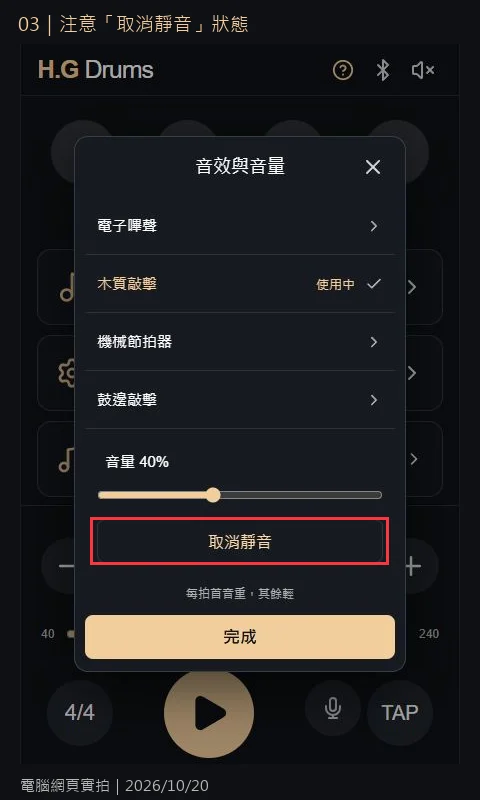
To restore sound, press “Unmute,”
confirm the button returns to “Mute,” then press “Done” to exit.
5. Return to the main screen, then press Play to confirm
After finishing the setup, return to the main screen and press the Play button,
to hear whether the selected timbre and volume suit your current practice.
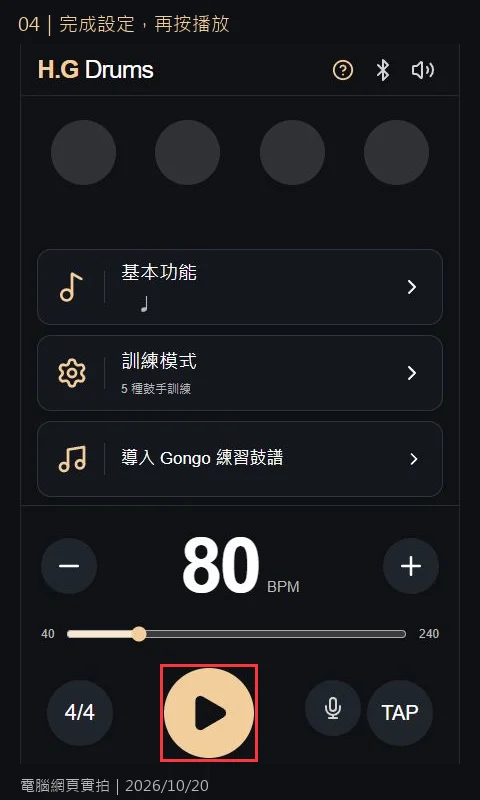
If you still need adjustments, pause first, then reopen the speaker settings.
Start by fixing the BPM and note value, only changing timbre or a small volume change to better hear differences.
6. Use a four-bar click to find a clearly audible setting
Gather your drumsticks and pad, choose a BPM you can comfortably maintain.
This screen shows 80; if too fast, reduce to a comfortable speed.
- Maintain 4/4 time, quarter notes, one hit per beat, alternating hands.
- First play a four-bar round with the wooden hit, note whether you can hear both the Click and your hit.
- Pause and adjust only one thing: switch timbre, or slightly adjust volume, then play another round for comparison.
- Once you find a clearly identifiable setting, fix it, and return to what you want to practice today.
The goal isn’t to let the Click overpower all sound,
but to keep up with the tempo and hear your own hits; no need to out-volume the metronome XD
FAQ
If I’ve chosen a timbre, why doesn’t the beat start?
Selecting a timbre in standby does not start playback. Press “Done” to return to the main screen, then press Play.
The volume is high, why is there still no sound?
First check you’re not muted, then check device volume and actual output location.
If you also enable a steady timing drill, make sure you’re not muted in that measure.
Can this make my Hi-Hat quieter?
No. This adjusts the metronome sound; the actual drum sound volume requires separate practice control.
What should I note about phones, tablets, and members?
This is a live capture from a computer page; phone and tablet layouts may vary, use the speaker icon as reference.
This workflow does not involve paid training credits; feature permissions follow what the site shows at that moment; keep the page open while practicing.
👉 turn on the H.G Drums metronome
👉 View the timbre and volume tutorial on the site
First tune the sound to a clearly identifiable level, then focus on practice.
Today let’s GONGO together too! 🥁